
A simple and powerful video converter
Not all video file formats are the same. They all have their different uses and purposes. With that in mind, it’s very important to convert your videos to an appropriate file format that is optimized for playing on your device. Aiseesoft Total Video Converter is a utility program that can convert videos to other file types and formats. The question is, with all of the great video converters in the market today, can Aiseesoft Total Video Converter keep up with the stiff competition?
Top Recommended Alternative

First Things First
In terms of functionality, there’s no denying that the Aiseesoft Total Video Converter is a good and acceptable program. The first thing to note about this program is its quick installation. The process took no time at all, and without much ado, the program was up and running. The design of the program is incredibly stylish and modern. It has a black and blue color scheme that’s very pleasing to the eye.
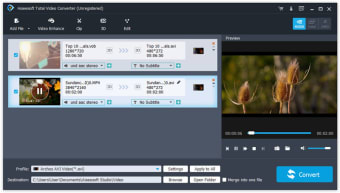
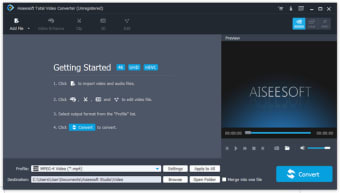
The interface of the program is also very intuitive. All the essential tools that you need are conveniently placed in an easy to find place on the screen. At the top is the menu bar and below that are the most common commands that you need such as Add File, Clip, 3D, and Edit. After that are the files and preview windows where the files that you added are going to be displayed and where you can view the final product, respectively. Finally, at the bottom is a drop-down menu where users can choose the profile of their videos. You can also choose the destination folder of your output.
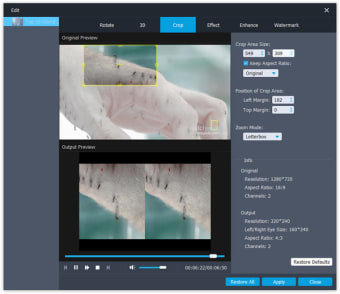
Converting and editing videos are easy and quick. All you have to do is add the file that you need and click the convert button. You can add several files and merge them into a single file. You can edit videos by clicking the Edit button. Some of the editing features available in the Aiseesoft Total Video Converter include being able to add 3D effects, crop videos, adjust video brightness, contrast, and more. You can also add a watermark and adjust the audio of your videos.
Problematic Features
While the Aiseesoft Total Video Converter is a pretty good converter overall, it does have some problematic aspects. For example, the conversion process takes a bit of time. While this isn’t a problem on its own, other video converters can accomplish the task in less time. Another frequent complaint against the program is its lack of DVD burning tools, and that’s a pretty valid point against it.
Worth It Despite the Problems
Ultimately, the Aiseesoft Total Video Converter is a worthwhile program despite the problems. The converted output is pretty good. In my opinion, it has a lot of features that more than make up for the problematic aspects. It’s simple, intuitive, and powerful. I think the Aiseesoft Total Video Converter can totally keep up with its competition. Go ahead and get your hands on it when you need to convert some videos because it can definitely deliver.






























.png)